
DBbet APK: download and install the DBbet app on your phone
The DBbet APK is DBbet's Android app as a file you install yourself from DBbet's link, because Google Play does not offer real-money betting apps in Egypt. It is free to download, installs in four steps and works as a sports betting app and casino on the same account, balance and bonuses as the website. On iPhone there is no app file to download: you add DBbet's site to your home screen from Safari in 3 steps (iPhone guide). Adults only (18+).
- Download the APK: the button above opens DBbet's site, where you tap ANDROID.
- Install it once you allow the install when Android asks.
- Log in or register with one DBbet account.
- Deposit within a budget you set first.
Download only from the official link
Take the DBbet APK only from this page's button or DBbet's own site. Fake copies spread through chat groups, forums and ads and can steal your login.
DBbet APK at a glance
| Item | Details |
|---|---|
| Android version | 7.0 or newer |
| File size | About 45 to 50 MB |
| Memory (RAM) | At least 2 GB |
| Free storage | At least 100 MB |
| Connection | 3G, 4G, 5G or Wi-Fi |
| Price | Free to download |
| Account | Same login, balance and bonuses as the website |
| Cashier | Same as the website, including Vodafone Cash |
| Updates | Manual, over the old version |
| iPhone | No app file to download: a home-screen shortcut from Safari, in 3 steps |
| Language | Support in Arabic |
Before you start
- Android 7.0 or newer: see Settings > About phone.
- Free at least 100 MB of storage.
- Use Wi-Fi (recommended) or a steady connection, so the file downloads in full.
- Android gives the install permission to one app only, the one that opens the file: in our pictures that is DBbet itself (step 3).
How to install the DBbet APK on Android
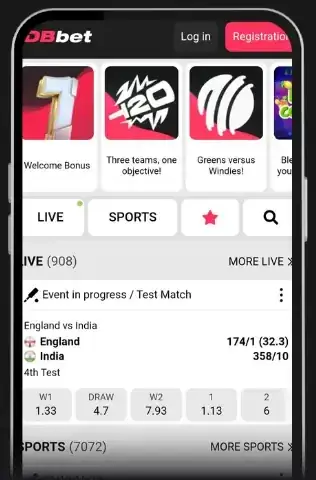
Open DBbet's site. The "Download the DBbet APK" button on this page opens it.
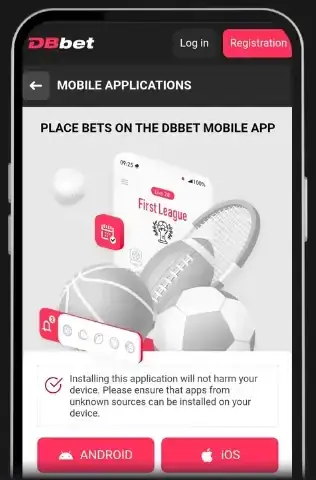
Tap «ANDROID» on the «MOBILE APPLICATIONS» page. If your browser warns that this type of file can harm your device, confirm the download: that warning is normal for files from outside Google Play.
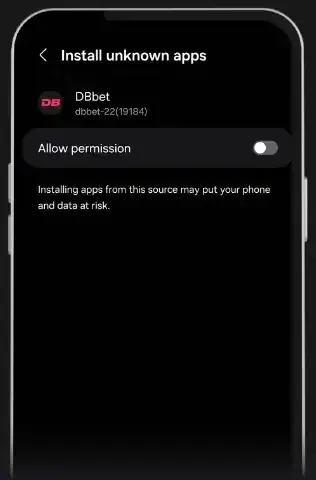
Open the file and allow the install when Android asks. In «Install unknown apps», switch on «Allow permission», then go back, check that the name reads DBbet and tap «Install».
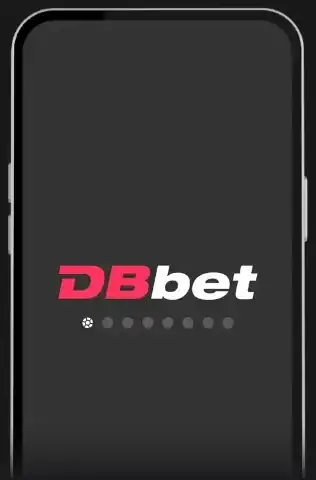
Open the app. The DBbet start screen appears; then log in or register, and switch the install permission off again as explained below.
The pictures on this page are screenshots of DBbet's site and Android in English. DBbet also has a full Arabic version, so the names may appear in Arabic on your phone, and Android's menu names also differ by phone maker: «Allow permission», for example, may read «Allow from this source».
Android 7: instead of the «Install unknown apps» permission in step 3, switch on "Unknown sources" under Settings > Security.
Afterwards: switch «Allow permission» off again for the app you allowed, under «Install unknown apps» (often in Settings > Apps > Special access; on Android 7, switch off "Unknown sources"). The app keeps working.
DBbet on iPhone
APK files only install on Android, and on iPhone there is no app file to download. Instead, you add DBbet's site to your home screen from Safari in 3 steps; it then works like an app, with the same account, balance and bonuses.
Open DBbet's own site (not this guide) in Safari: this button opens it.
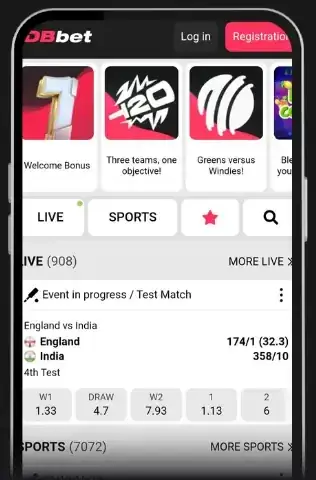
Open DBbet's site in Safari. The button above these steps opens it.
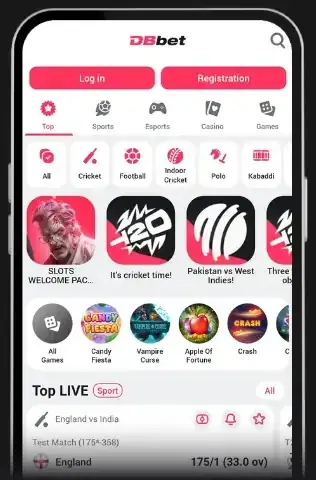
Log in or register with the buttons at the top: «Log in» if you have an account, «Registration» to open one.
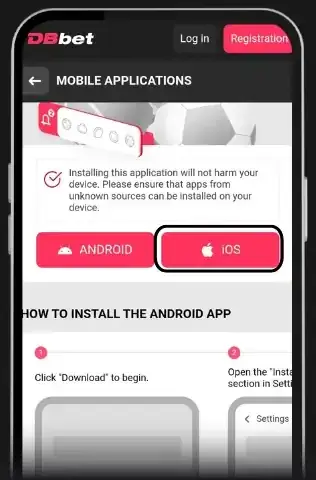
Tap «iOS» on the «MOBILE APPLICATIONS» page and follow the steps DBbet shows: «Share», then «Add to Home Screen», then «Add».
Share is the square with an arrow; on newer iOS it may sit under the ••• button. If you do not see Add to Home Screen, scroll down the menu.
The shortcut opens DBbet full screen; log in with your usual account. Removing it deletes only the shortcut. If an iOS update removes it, add it again.
After installing: account, bonus and deposits
Log in with your DBbet account, or register in the app. DBbet asks you to confirm your phone number and email, and uses two-factor authentication (2FA) to protect the account. Sign-up guide: التسجيل (in Arabic).
- Bonus: pick sports or casino bonuses in My Account before your first deposit. Sports welcome bonus: 100% on your first deposit up to EGP 6,182.13, then 50% and 25% on your 2nd and 3rd deposits, up to EGP 13,937.13 in total. Casino: the Slots Welcome Package, up to EGP 93,041.20 plus 150 free spins over 4 deposits. Terms: bonus page.
- Promo code:
DBBETEG; more on البرومو كود (in Arabic).
Deposits use the website's cashier: local methods from EGP 15, with deposits and withdrawals in 5 to 15 minutes.
 Vodafone Cash
 InstaPay
 Etisalat Cash
 Orange Cash
- Etisalat
 Orange
 USDT (TRC20) (no bonuses)
Limits per method: طرق الدفع (in Arabic). Set a budget before you deposit: see responsible gambling.
Updating the DBbet APK to the latest version
Updates are manual: download the newest APK from this page's button and install it over the old app. You do not need to uninstall first; your account and balance stay on DBbet's servers. Some Android versions ask for the install permission again with each update. Never install an "update" sent in a message.
DBbet APK not installing? Fixes for common messages
- "App not installed": free about 100 MB, or remove an older broken copy of DBbet.
- "Parse error", or a file that won't open: download again on a steady connection, and check for Android 7.0 or newer.
- "Not allowed to install unknown apps": repeat step 3 for the app named on the permission screen: DBbet in our pictures, or your browser or Files app if you opened the file from there.
- The app opens, then closes: restart the phone, install the newest APK over it, or clear its cache in Settings > Apps > DBbet > Storage.
- Login fails in the app: try your phone's browser. If you can log in there, update or reinstall the app.
- Connection errors: set the date and time to automatic; secure connections fail when the clock is wrong.
Still stuck? DBbet support works in Arabic: the support section inside your DBbet account, or email [email protected]. Or see our help page.
Security and app permissions
- Fake APKs: the file and the installer must show the name DBbet; if not, cancel and delete the file.
- Permissions: a betting app has no need for your contacts, SMS or call history; if it asks, cancel. Review them in Settings > Apps > DBbet > Permissions. Limiting its notifications also helps you bet only when you choose.
- Play Protect: keep it on. If it shows "App scan recommended", scan. If it calls the app blocked or harmful, do not install: download again from this page.
- Codes: DBbet staff do not ask for your full password. Never share your wallet PIN or one-time codes (OTP).
How to uninstall the DBbet app
Open Settings > Apps > DBbet and tap Uninstall. Only the app goes; your account and balance stay with DBbet. Removing betting apps can also help you take a break: see our responsible gambling page.
Aviator download: no separate app needed
Aviator runs inside DBbet's casino, in the app or the browser, so there is no separate "Aviator APK": install the DBbet APK and open the casino. See our Aviator guide.
Avoid "Aviator predictor" apps: every round is random, and such files can steal your login. Why: برامج توقع لعبة الطيارة (in Arabic).
Frequently asked questions
How do I download the DBbet app on Android?
Tap "Download the DBbet APK" on this page to open DBbet's site, then tap «ANDROID» on its «MOBILE APPLICATIONS» page and confirm the download. Open the file, switch on «Allow permission» when Android asks, go back and tap Install, then open the app and log in or register. Each step is pictured in the Android guide.
Why is the DBbet app not on Google Play?
Google Play does not offer real-money betting apps in Egypt, so DBbet's Android app comes as an APK file from DBbet's own link.
Is it safe to install the DBbet APK?
Treat it like any app from outside Google Play: download only from this page or DBbet's own site, check the installer shows DBbet and keep Play Protect on.
Does the DBbet APK work on iPhone?
No, APK files are for Android, and on iPhone there is no app file to download. Instead, open DBbet's site in Safari, tap «iOS» on its «MOBILE APPLICATIONS» page and follow DBbet's steps: «Share», then «Add to Home Screen», then «Add».
How do I update the DBbet APK?
Install the newest APK from this page over the old one. No need to uninstall; your account and balance stay.
What should I look for in a sports betting app?
No app is the best sports betting app for everyone. Check that it comes from the operator's own link, asks only for permissions it needs, shows odds and returns clearly, takes deposit methods that work in Egypt and lets you limit spending. For a football betting app, check that your leagues are covered. More in برامج المراهنات (in Arabic).